Zero-Trust Methods for Secure WEB Portal Access
Introduction
Modern zero-trust security models require every access request to be continuously verified, monitored, and controlled — especially when users connect to WEB Portals. In today’s environments, privileged access management is no longer limited to simple authentication. Organizations now require continuous policy enforcement, session visibility, auditing, approval workflows, and intelligent oversight for every privileged interaction.
Over the last decade, WEB Portals have become a primary interface for managing network infrastructure, cloud platforms, virtualization systems, and SaaS applications. Traditional command-line interfaces, terminals, and console access are increasingly being replaced — or supplemented — by browser-based administrative consoles. As a result, Privileged Access Management (PAM) platforms must extend zero-trust principles beyond SSH and RDP to include secure, governed access to WEB applications.
To address this shift, organizations need PAM solutions capable of delivering:
- Credential injection without exposing passwords to users
- Just-in-time TOTP generation and injection for shared MFA
- Role-based access control (RBAC)
- Approval workflows for privileged sessions
- Session auditing
- Transparent and secure access experiences
- Centralized policy enforcement across WEB applications
This article explores several methods of accessing WEB Portals through the 12Port Privileged Access Management (PAM) platform. Each approach offers different levels of transparency, usability, control, maintenance and security depending on operational requirements and application architecture.
The following WEB Portal access methods are covered:
- Password Filler browser extension
- Transparent access through an RDS jump host
- WEB HTTP Sessions
Browser Extension
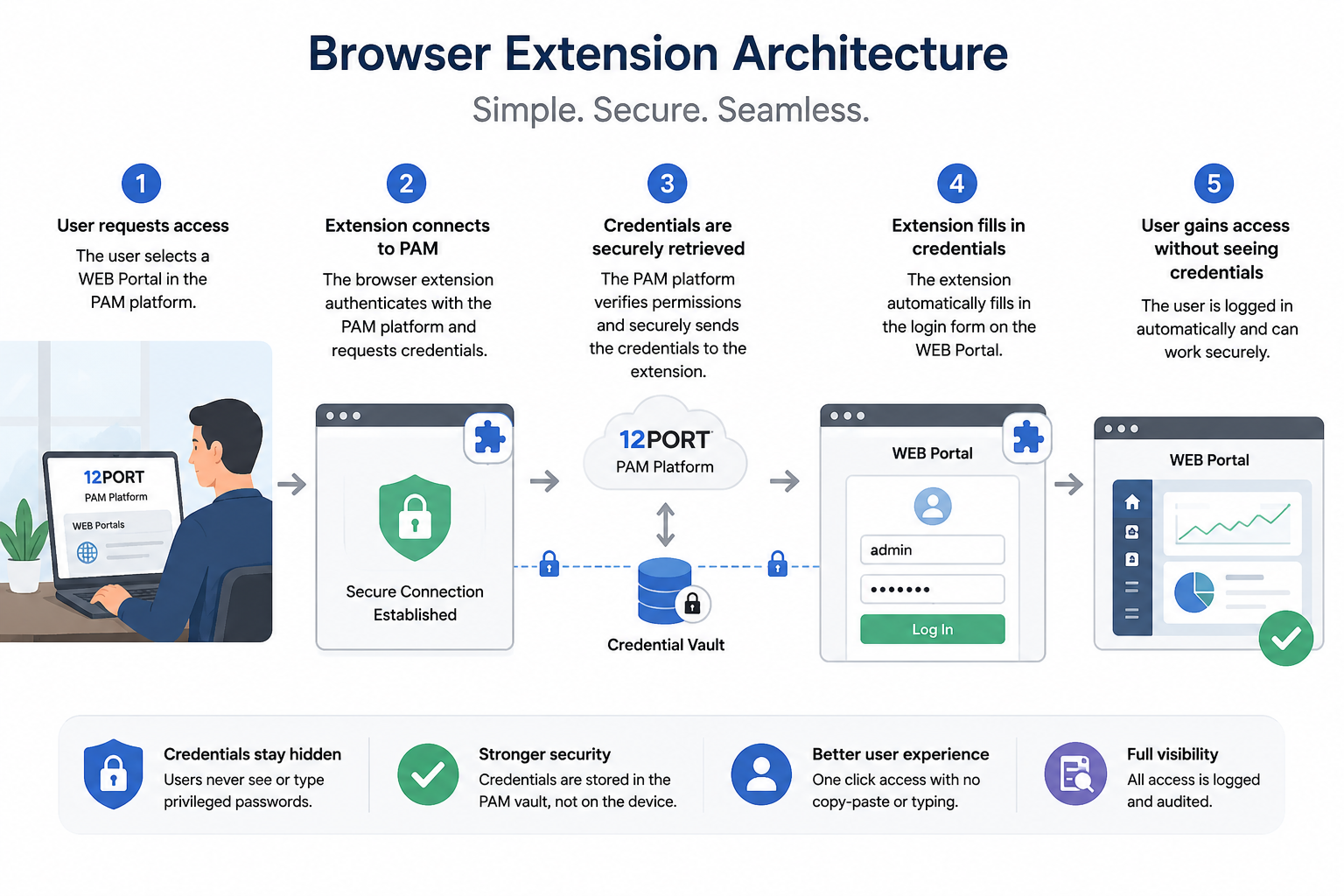
One of the simplest and most widely adopted approaches is the use of a browser extension that securely injects credentials into WEB login forms.
In this model, the 12Port PAM platform stores privileged credentials securely inside the PAM vault. When a user accesses a protected WEB Portal, the browser extension automatically retrieves the authorized credentials and fills the login form without exposing the password to the user.
Best-fit scenarios
- Low to medium risk administrative portals
- SaaS applications
- Operational environments prioritizing usability
- Organizations beginning their zero-trust PAM journey
Key Advantages
- Simple deployment model.
- Minimal infrastructure requirements.
- Native browser experience.
- Fast adoption by end users.
- Supports role-based access policies, approval workflows and access audit.
- Automatic credential and just-in-time TOTP injection into single- or multi-page authentication forms
Trade-offs
- Limited session recording capabilities.
- Password round trip to the client workstation.
- Limited ability to centrally terminate, suspend, or fully control active WEB sessions after authentication has been completed.
RDS Jump Host
A more controlled approach involves routing WEB Portal access through a secured Remote Desktop Services (RDS) jump host.
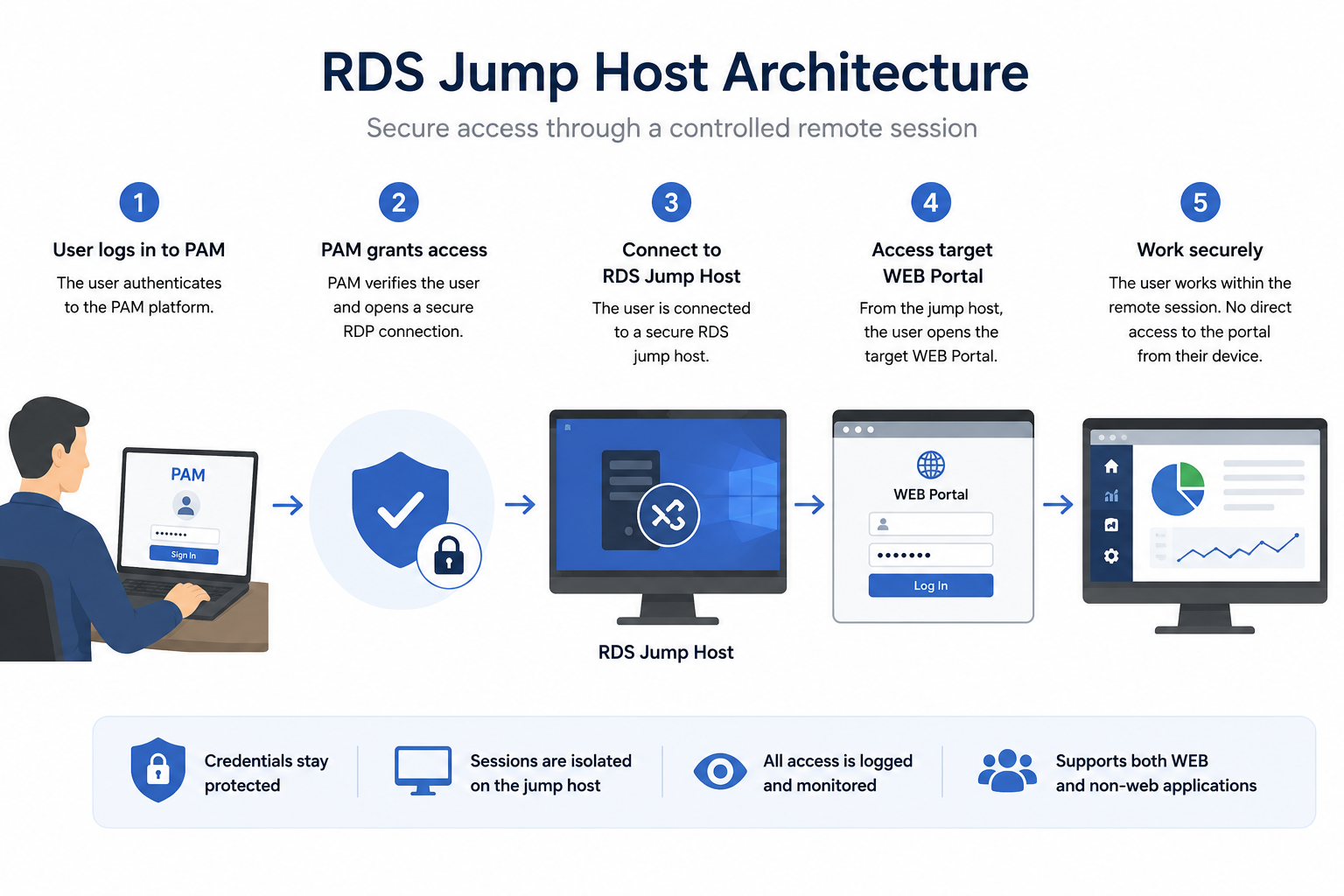
In this model, users first authenticate to the 12Port PAM platform, which securely brokers access to a hardened RDS jump server. Once the session is established, the PAM system automatically launches a WEB browser as the only application visible to the user. The browser opens directly to the target WEB Portal URL retrieved from the privileged credentials vault.
Before the user gains control of the session, 12Port PAM uses injects the appropriate credentials from the secure vault into the WEB Portal login form. This ensures that privileged credentials are never exposed to the user or transferred to the local workstation.
Only after successful authentication does the platform transfer interactive control of the browser session to the user. From that point forward, all interaction with the WEB Portal takes place entirely within the isolated remote RDP session rather than directly from the user’s endpoint device.
This approach combines strong credential protection, session isolation, centralized auditing, and a transparent user experience, while maintaining strict zero-trust access controls. The tradeoff is the need for additional infrastructure, including hardened RDS jump hosts and remote session management components.
Despite the increased operational overhead, this has historically been the traditional method used by PAM practitioners to secure and manage access to WEB Portals before more advanced native WEB session technologies became available.
Best-fit scenarios
- High-security administrative environments
- Critical infrastructure management
- Regulated industries
- Third-party vendor access
- Privileged access requiring full auditability
Key Advantages
- Full session isolation
- Complete session video recording and auditing.
- Centralized browser management
- Credentials never reach the local workstation
- Automatic credential and just-in-time TOTP injection into single- or multi-page authentication forms
- Clipboard and file transfer policies can be enforced
- Access can be instantly terminated or suspended
- Supports role-based access policies, approval workflows and access audit.
- Organizations that can reuse existing PAM-managed RDS infrastructure to provide zero-trust access for non-browser-based applications such as database management and legacy administrative tools.
Trade-offs
- Increased infrastructure requirements
- Higher resource consumption
- Complex deployment and management.
WEB HTTP Sessions
The most unique and innovative approach involves native WEB HTTP session proxying directly through the PAM platform. This method combines the security advantages of remote browser session isolation with a significantly simpler architecture by eliminating the need for dedicated RDS infrastructure.
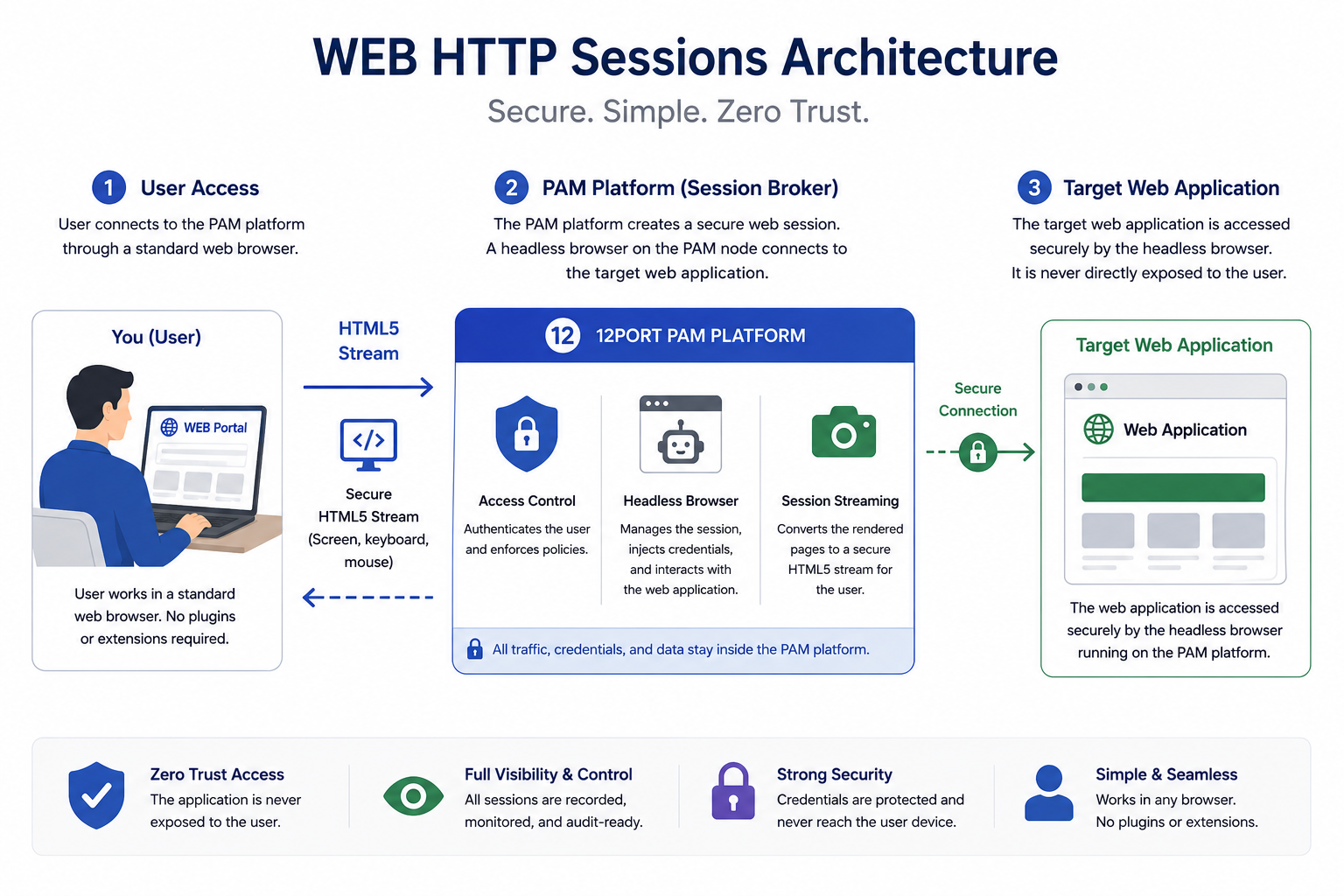
This approach relies on a headless browser driver running on 12Port PAM nodes, with the session streamed securely to the user through an HTML5 gateway accessible from the client browser.
In this model, the 12Port PAM platform acts as an intelligent intermediary between the user and the target WEB application. Rather than exposing the WEB Portal directly to the endpoint device, the PAM system brokers, isolates, and controls the entire HTTP/HTTPS session.
Each WEB HTTP session launches an isolated headless browser instance on the PAM node host, which establishes and manages the connection to the target WEB Portal. The PAM platform automatically retrieves credentials from the secure vault and injects them into the WEB application’s authentication forms without exposing sensitive credentials to the user.
The headless browser continuously renders the remote session, converts browser output into HTML5-compatible streamed content, and delivers it securely to the user’s local browser. At the same time, keyboard and mouse interactions from the user are relayed back through the PAM platform to the remote browser driver in real time.
This architecture provides a seamless user experience while maintaining full session isolation, centralized auditing, credential protection, and granular policy enforcement. By keeping all privileged WEB interactions contained within the PAM-controlled environment, organizations can implement true zero-trust governance for browser-based administrative access without the operational overhead traditionally associated with RDS-based solutions.
Best-fit scenarios
- Enterprise-scale zero-trust architectures
- Highly regulated and compliance-driven environments
- Security-sensitive administrative and management portals
- Organizations seeking maximum visibility, auditing, and policy enforcement
- Organizations of any size looking to implement simple and transparent zero-trust access to WEB Portals
- Managed Service Providers (MSPs) delivering secure, browser-based privileged access services to their clients
- Environments aiming to reduce infrastructure complexity by eliminating dedicated RDS jump hosts
- Distributed and remote workforces requiring secure access without deploying client-side software or browser extensions
Key Advantages
- Fully transparent user experience aligned with RDP and SSH access
- Complete session visibility, video recording and auditing
- Supports role-based access policies, approval workflows and access audit.
- Fine-grained access controls including URL filtering
- Credentials never reach the local workstation
- Automatic credential and just-in-time TOTP injection into single- or multi-page authentication forms
- Clipboard and file transfer policies can be enforced
- Access can be instantly terminated or suspended
- No jump host infrastructure required
Trade-offs
- High CPU and RAM requirements on the server-side RBI environment.
- The model does not extend to non-browser-based applications applications such as database management and legacy administrative tools.
Choosing the Right WEB Access Strategy
There is no single universal approach to securing WEB Portal access. The optimal solution depends on:
- Security requirements
- User experience expectations
- IT maintenance expectations
- Compliance obligations
- Infrastructure maturity
- Application compatibility
- Operational complexity tolerance
Many organizations adopt a hybrid strategy, using different methods for different risk levels and application types.
We recommend using the Password Filler Extension for low- to medium-risk administrative portals where simplicity of deployment, ease of use, and minimal infrastructure requirements are the primary objectives. This approach provides a lightweight method of securing privileged WEB access while maintaining a familiar browser experience for end users.
RDS jump host access is best suited for environments that require zero-trust access not only to WEB Portals, but also to thick-client and non-browser applications such as database management tools, legacy administrative software, and specialized enterprise applications. Although this model requires additional infrastructure, it offers strong session isolation and a unified approach for securing multiple application types.
WEB HTTP Sessions provide the optimal balance of security, operational simplicity, and user experience for browser-based administrative access. By eliminating the need for dedicated RDS infrastructure while maintaining full session isolation, credential protection, auditing, and centralized policy enforcement, this approach simplifies management for IT administrators, reduces operational overhead for system owners, and delivers seamless zero-trust access to WEB Portals directly through a standard WEB browser.