Data Architecture: Tenants, Sites, Databases and URLs
This article describes the data architecture of a 12Port deployment. It explains where data is stored, how it is organized, and how 12Port provides access to it.
Tenants
Each 12Port deployment is a multi-tenant environment.
A simple deployment intended for a single project might include only one Asset tenant. Larger environments, such as managed service providers (MSPs) serving multiple clients or enterprises with several subsidiaries or departments, may deploy multiple Asset tenants. Additional tenants may also be used for staging, training, or experimental purposes.
Warning
Tenants do not share data, configuration, or security architecture.
Tenant Database
Each tenant stores data in its individual database.
This design ensures strict data separation between tenants, preventing any cross-tenant data access.
12Port includes an embedded database server (Apache Derby). A tenant may use this embedded database as its backend data store, in which case its data is maintained in a dedicated database managed locally on the 12Port host.
Alternatively, a tenant can use an external relational database provided by a third-party vendor. 12Port supports multiple commercial, free, and open-source database systems, including Oracle RDBMS, Microsoft SQL Server, MySQL, MariaDB, and PostgreSQL.
Note
Different tenants might use databases from different vendors.
Multi-Node Deployment
In any particular deployment a tenant might play one of the the following roles:
-
Standalone - An isolated Asset tenant.
-
High Availability Tenant - An active backup tenant in a high-availability deployment, sharing a database with a tenant in another deployment.
-
Disaster Recovery Tenant - A passive backup tenant receiving database replication from a tenant in another deployment.
-
Peer Tenant - A peer tenant for a tenant in another deployment providing access to resources in an isolated datacenter or increasing access and execution capabilities of another tenant.
Note
In a multi-node deployment, the set of tenants on the nodes do not need to match. When planning such deployments, consider the role of each tenant and deploy them where needed. A deployment might contain tenants of different roles sharing data with tenants of different deployments.
Note
The Base tenant is not replicated across deployments. Therefore, it is not recommended to use Base tenant users for Asset tenant activities. Instead, use users from Asset tenants or their integrated user directories. Asset tenant users and their associated security configurations are replicated to backup tenants as needed.
Tenant URL
Users access a tenant’s web console and web sessions through a tenant-specific URL. Each tenant presents a unique login page with configurable branding and its own integrated user directories.
Note
The structure of the tenant URL will be discussed later, after introducing the site hierarchy.
Base Tenant
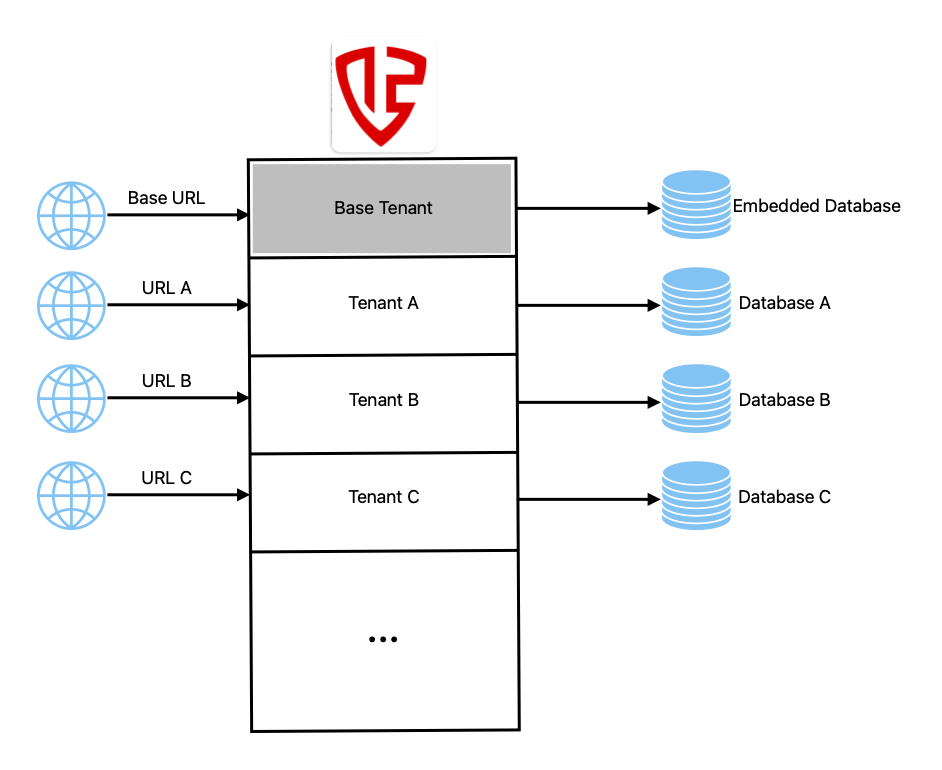
Each deployment includes a Base Tenant, which is always deployed with the embedded database and accessible via the Base tenant URL:
The Base Tenant manages all other tenants within the deployment.
It also stores master keys for data encryption used by Asset tenants. These master keys are themselves encrypted by a meta-master key, which is stored in each tenant’s database.
This architecture separates encrypted tenant data from the keys that encrypt it.
The Base Tenant does not store data itself (which is the purpose of Asset tenants), but it supports the same integrations as Asset tenants. For example, its user and group-based authorization can be integrated with Microsoft Active Directory, and it can enforce TOTP or other configured MFA methods.
Tenant Architecture Diagram
The following diagram illustrates a typical deployment with three Asset tenants; Tenant A, Tenant B, and Tenant C; along with the Base Tenant.
Sites
Asset tenants organize their data in a hierarchy of sites.
The root site is the top-level site. Every tenant has at least one root site. A site may contain multiple sub-sites, and each sub-site can have its own sub-sites, forming a hierarchical structure. All sites within a tenant use the same database.
Organizing assets into a Sites and Sub-sites hierarchy makes it easier to manage large, distributed environments. Assets can be grouped by geography, business unit, customer, environment (production, test, development), or any other logical structure, making them easier to find and manage. The hierarchy also simplifies delegated administration by allowing permissions, policies, workflows, and configuration settings to be inherited by entire groups of assets, reducing administrative effort, improving consistency, and helping organizations scale their PAM deployment as their infrastructure grows.
Site Configuration Inheritance
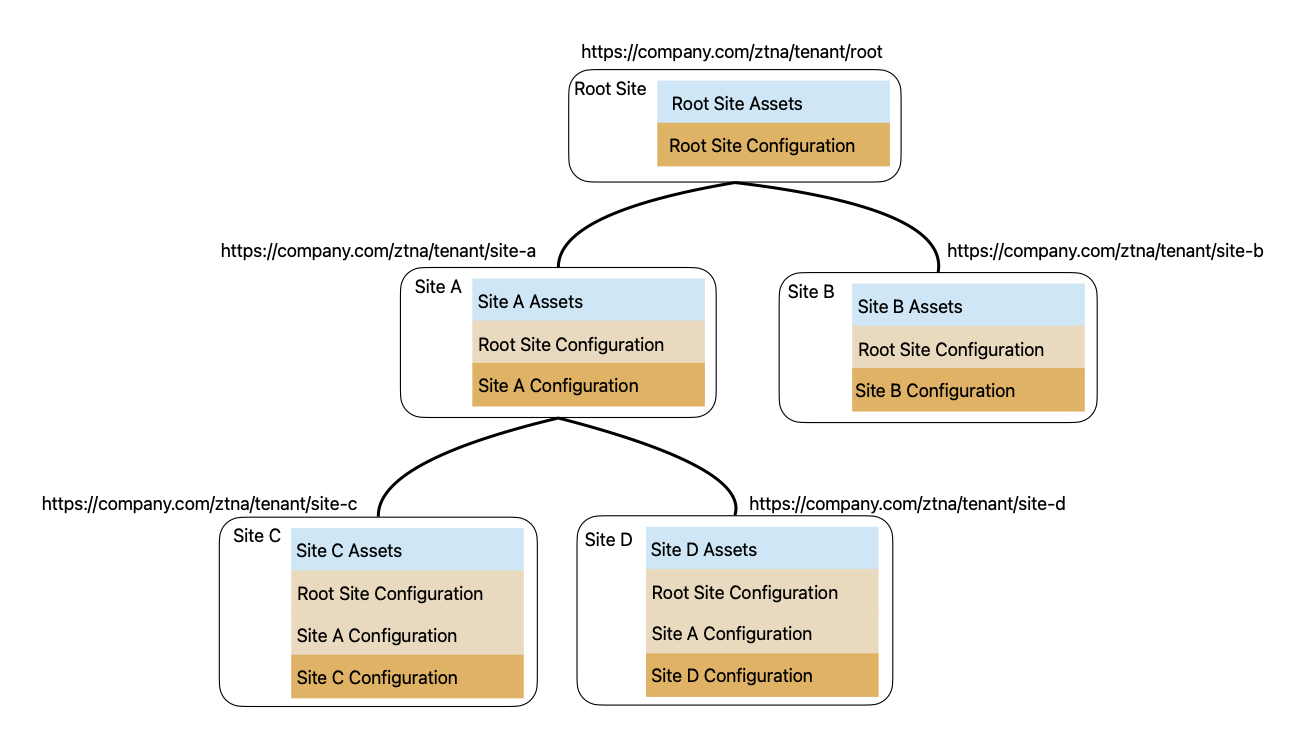
Site configuration is inherited from parent sites. A site can extend its inherited configuration with additional settings, and those changes are passed down to its own child sub-sites, which may further extend them.
Example
The root site might be integrated with Microsoft Active Directory and enforce TOTP MFA.
A sub-site could additionally integrate with YubiKey and enforce YubiKey MFA for specific users. This sub-site's YubiKey integration would not be available at the parent root site but would be on the sub-site and its children.
Example
Asset types are inherited to sub-sites. However, new asset types created in a sub-site are not available to its parent sites.
Site Data
Each site manages a unique set of assets organized in a container hierarchy. Relationships between assets (such as Membership or Reference Assets) cannot be established across sites.
Site URL
A site URL is constructed from the web application host, deployment context, tenant name, and site name. For example:
Where:
- https://12port.company.com is the WEB application host.
- ztna is the fixed deployment context.
- tenant-name is the tenant name.
- site-name is the site name.
Note
The site URL does not reflect the site hierarchy or sub-site relationships. It includes only the site name, so each site name must be unique within a tenant.
Example
Each tenant has a root site with the URL: https://12port.company.com/ztna/tenant-name/root
Example
Base tenant URL provided earlier is: https://12port.company.com/ztna/base/root
Personal Site
Each application user with the site role Personal Site Owner may provision a personal site.
Personal Sites provide users with an isolated workspace within the PAM Vault for managing their own personal assets independently of the primary site vault. Unlike the main site, which is designed for collaborative administration and shared access, a Personal Site is owned by a single user and is intended for storing and managing personal credentials and assets.
Assets stored in a Personal Site are included in searches performed by the browser form-filling extension to quickly locate and use credentials from both shared and personal assets when filling login forms.
Site Architecture Diagram
The following diagram shows an example site hierarchy within a sample tenant. Note the root site at the top of the hierarchy, the unique set of assets managed by each site, configuration inheritance down the site hierarchy, and the construction of site URLs.
Containers
Containers allow assets to be organized into a logical hierarchy within a site instead of storing everything at the site root. By grouping related assets into nested containers, organizations can structure their environments by location, business unit, application, environment, or any other operational model. This hierarchical organization simplifies navigation, improves asset discovery, and makes large deployments easier to manage.
Beyond organization, containers provide inheritance for permissions, workflows, peer node assignments, and access profile configurations. Settings defined at a container level are automatically inherited by all nested containers and assets unless explicitly overridden. This inheritance model reduces administrative effort, ensures consistent application of security policies across the environment, and still provides the flexibility to customize specific containers or assets where operational or security requirements differ.
Containers within a site share the same site URL, with optional parameters used to identify specific locations within the container hierarchy. This provides a consistent access point while allowing direct navigation to individual containers or assets when needed.