Replication
This document provides technical documentation for the Tenant Database Replication engine within the 12Port Privileged Access Management (PAM) solution. It outlines deployment topologies, data models, transport mechanisms, and configuration schemas required for system administrators to deploy and maintain multi-node synchronization.
For detailed information on the deployment scenarios supported by this architecture (including Disaster Recovery, Isolated Locations, Data Caching, and Session Relays), please refer to the Replication FAQ.
Functional Introduction
The 12Port PAM architecture supports stateful database replication between distributed application nodes. The core replication subsystem utilizes an asynchronous journaling engine that intercepts and records all Data Manipulation Language (DML) equivalent actions, specifically creates, updates, and deletes (CUD), executed against configuration parameters, management objects, and system logs.
Data synchronization across designated peer nodes is executed via stateless HTTP application layer transactions targeting the native application REST API.
Data Scope: Replication operates exclusively on database-resident tenant data captured through the application journaling subsystem. Objects whose primary payloads are stored outside of the database are not processed by the replication engine. Examples include session recordings, uploaded files, and other externally persisted binary assets. Administrators requiring synchronization of these resources must implement independent storage replication or backup mechanisms.
Replication Architecture
The 12Port PAM architecture features a flexible, tenant-isolated data replication subsystem designed to maintain state consistency across distributed environments.
- Transport & Agnosticism: Operating at the object-model layer via secure HTTPS REST APIs, the engine is entirely database-agnostic, allowing peer nodes to run completely mismatched backend database systems.
- Data Classification: The engine categorizes synchronization traffic into Active Data (operational configurations and management objects) and Passive Data (system logs and reports).
- Network Traversal: Traffic is orchestrated using complementary Push or Pull routing orientations, allowing administrators to easily bypass strict firewall or unidirectional network ACL constraints.
- Performance Tuning: Operational impact is managed via targeted execution strategies. These range from near real-time, low-latency Active pushes to asynchronous, interval-based Scheduled or Background batch operations that prevent user interface lag.
For a deeper look into deployment topologies, performance tradeoffs, and advanced synchronization scenarios, please refer to our Replication FAQ.
Topology Filtering (Peers Network)
In complex topologies (such as a multi-spoke star network), a single hub node may ingest journal data originating from many different regional nodes. To prevent unintended loop replication or data leakage, the engine features metadata filtering. Administrators can restrict Push and Pull tasks to only process data that originated from specific source node IDs.
For example, a central Main node can be configured to push global policy configurations down to a branch peer node while automatically omitting data it ingested from other branch peers.
Active-Active Replication Consideration: In active-active replication topologies, administrators must ensure that the source node contains the intended authoritative state before enabling bidirectional synchronization operations. When conflicting object states exist between peers, synchronization follows the configured replication direction and may propagate deletions or configuration changes from one node to another.
For example, if a user permission is removed from Node A but remains assigned on Node B, synchronizing from Node A to Node B removes the permission on Node B. Synchronizing in the opposite direction may restore the permission on Node A. Administrators should verify the intended source of truth before performing synchronization between peers with divergent states.
Authentication and Access Control
Because the replication transport layer utilizes standard HTTPS REST endpoints, node-to-node authentication requires a cryptographic API Token. Mutual authorization is achieved when a node explicitly defines an external system as an authorized peer within its internal replication configuration table.
Security Authorization Prerequisite: The user identity associated to the API Token must be explicitly granted the Site Role: Service permission. Lacking this assignment, incoming replication payloads will be dropped during API routing.
Configuration Schema
Replication profiles are established by building explicit peer-to-peer mapping configurations. For complex distributed meshes, a single node will maintain an array of multiple configuration blocks.
Parameter Reference
Every replication profile entry requires the following explicit parameters:
| Parameter Field | Data Type / Format | Operational Definition |
|---|---|---|
| Name | Alphanumeric String | Unique administrative identifier for the replication mapping entry. |
| Push Nodes | Comma-Separated String | Filter array containing the source hostname(s) originating the data to be pushed. Matches the Host value visible on the system About interface (either local or previously ingested via upstream replication). |
| Push Tenant | Alphanumeric String | The specific source tenant context originating the data payload intended for outbound push. |
| Push Strategy | Selectable Values | Active | Background | Scheduled | Passive | None |
| Pull Nodes | Comma-Separated String | Filter array containing the hostname(s) originating the data to be pulled. Typically matches the remote peer's Host value visible on its About interface. |
| Pull Tenant | Alphanumeric String | The target tenant context on the remote peer from which data should be pulled. |
| Pull Strategy | Selectable Values | Background | None |
| URL | Absolute URI String | The fully qualified target endpoint address matching the syntax rule:https://<host>:<port>/ztna/tenantName/siteName |
| Token | Cryptographic String | The functional REST API bearer token generated on the target node to authenticate incoming replication requests. Note: The identity tied to this token must have the Site Role: Service assigned to it. |
| Enabled | Boolean (True/False) | Master toggle to activate or deactivate the individual replication worker threads. |
Push and Pull Modes
To accommodate complex firewall and routing constraints, synchronization can be initiated from either side of the network boundary using two directional vectors:
- Push Mode: The local node initiates an outbound connection to the remote peer API, transmitting serialized journal deltas to create, update, or erase objects on the target.
- Pull Mode: The local node initiates an outbound connection to the remote peer API to request outstanding journal packages, applying those delta modifications locally.
Directional Rule: Directional modes are purely network-routing mechanisms determined by which node possesses outbound ACL permissions to establish a TCP handshake. Directional orientation does not dictate data lineage or master-slave hierarchy.
Push Replication Strategies
- Active: Triggers immediate, low-latency API calls to the remote peer upon any local change to Active Data. The replication transaction is executed within the same server-side operation that commits the originating database change. As a result, administrative interface actions may remain blocked until the replication attempt completes. If the target peer is unreachable, a timeout occurs, or any other transmission error is encountered, the journal is automatically demoted to the Background strategy for retry processing.
Performance Note: This strategy runs synchronously with the administrative interface. It requires an unconstrained, high-speed network backbone to prevent user interface lag during commit phases.
-
Background: Executes an asynchronous, non-blocking background worker triggered immediately by data mutations. The worker attempts to transmit the journal to the remote peer up to five times using randomized retry intervals, typically measured in minutes. This strategy isolates user interface performance from network latency. If all retry attempts fail, the journal is retained locally and automatically demoted to the Scheduled strategy.
-
Scheduled: Utilizes a periodic background task runner to process all outstanding journals that have not yet been successfully replicated. Failed journals remain queued in local storage and are retried during subsequent execution cycles until successful delivery. This is the only Push strategy that processes both Active Data and Passive Data structures.
-
Passive: Suspension of active outbound transmission. The local node stores all journal modifications internally and waits for a remote peer node to retrieve them via a configured Pull operation.
-
None: Explicitly disables all outbound Push replication threads for the configuration instance.
Strategy Selection: Administrators may configure replication profiles to bypass portions of the normal Active > Background > Scheduled execution chain. For example, a profile may begin directly in Background mode or rely exclusively on Scheduled processing. Additionally, certain data classes are always processed through scheduled replication workflows and cannot participate in Active or Background delivery. Event log records are a common example unless they are generated as part of another actively replicated transaction.
Consistency Model: Active Push provides the lowest synchronization latency and is the closest approximation to real-time state consistency between peers for Active Data. All queued replication mechanisms, including Background retries, Scheduled processing, Passive Push with Pull retrieval, and journals awaiting re-transmission after a failed Active delivery, introduce a temporary synchronization delay. During this interval, replicated nodes may contain divergent data until the outstanding journals are successfully processed.
Pull Replication Strategies
- Background: Invokes an asynchronous background task runner at set periodic intervals to poll the remote peer API for new journal updates.
Journal Lifecycle: When a Pull operation retrieves a journal from a remote peer, the journal remains retained on the source node until successful processing has been confirmed by the receiving node. Upon successful application, an acknowledgment is returned and the source node removes the journal from its local queue. If processing fails or connectivity is interrupted before acknowledgment occurs, the journal remains available and will be attempted again during subsequent Pull cycles.
- None: Explicitly disables all inbound Pull replication polling threads for the configuration instance.
Authorization Alignment Matrix
To ensure functional data synchronization and API authorization, administrators must deploy complementary configuration pairings across peers. The following combination examples represent valid operational states:
| Local Node Configuration | Target Peer Node Configuration |
|---|---|
Pull Strategy Enabled (Background) | Push Strategy set to Passive |
Push Strategy set to Active | Push & Pull Strategies both set to None |
Allow Jobs
The Allow Jobs setting controls which jobs are executed on a node in a multi-node PAM deployment.
- Enabled: The node executes all jobs, regardless of where the triggering request or asset originated.
- Disabled: The node executes only:
- Jobs triggered by completion of requests that originated on the local node.
- Jobs created on assets that originated on the local node.
When Allow Jobs is disabled on a DR node, jobs triggered by request completions originating on the Main node are not executed on the DR node. This prevents duplicate job execution while the Main node is available.
If a request originates on the DR node while the Main node is unavailable, the DR node executes the job triggered by completion of that request.
Main Node Failure
If a request originated on the Main node and remains active when the Main node becomes unavailable, completing the request on the DR node does not execute the associated job. To allow the DR node to execute such jobs, configure Main Node on the Peer Node configuration page to enable live status detection for the Main node.
Important: Enabling this behavior introduces active-active job execution. A job may be executed by the DR node while the Main node is unavailable and executed again by the Main node after it becomes available. This is particularly important for password reset jobs, which cannot be safely run more than once.
For a DR or secondary node, set Allow Jobs to False to prevent duplicate job execution during normal operation. Configure Main Node only when the deployment requires the DR node to process jobs for requests that originated on an unavailable Main node.
On-Demand Replication Synchronization
In addition to transaction-driven execution strategies, the replication engine supports On-Demand Replication Synchronization. While standard replication relies on real-time journal event-streaming (capturing changes at the moment of commit), the synchronization process scans the database natively for all new or updated objects within a specified historical window and synchronizes them across the network.
This mechanism acts similarly to an incremental network-based backup and restore operation, ensuring state consistency between two online peer nodes.
Object Deletion Handling: On-Demand Replication Synchronization preserve full object lifecycle state by processing created, updated, and deleted objects. When synchronization detects objects that were removed from the source within the processed data range, the corresponding objects are removed from the target system. This ensures that revoked permissions, deleted assets, and removed configuration objects (excluding audit log data) are not retained on the destination peer.
Functional Characteristics
- Bulk Delta Inspection: The synchronization worker scans the underlying database for modifications made over a user-defined number of days. It aggregates these changes and executes a bulk transfer over the REST API.
- Catch-Up & Recovery: This process identifies and processes object updates missed during network partitions, power disruptions, or periods when real-time journal processing was explicitly paused.
- Network Tuning for DR Topologies: For Disaster Recovery (DR) topologies, administrators can use on-demand synchronization to manually backfill state changes from an active peer. This eliminates the need to maintain an idle, continuous real-time replication stream that generates constant network traffic.
- Disabled Configuration Testing: On-demand synchronization can be executed against replication profiles where the master
Enabledtoggle is set toFalse. This allows administrators to safely test replication pathways or perform high-volume bulk-data seeding before enabling live, real-time transaction processing.
Performance & Network Warning: Because this mechanism processes historical deltas in bulk rather than streaming individual operations sequentially, it generates significantly higher transient network traffic and payload sizes than standard Active or Background strategies.
Operational Execution
To initiate a manual synchronization:
- Navigate to the Configuration > Replication page.
- Locate the Replication Profile and select its Actions > Synchronize option.
- Select the Synchronization Type:
- Full: Synchronizes all available data since the provisioning of the tenant.
- Incremental: Synchronizes data within a defined historical window. Specify the
Daysvalue to set the lookback period. The default value is 1 (day).
- Start the task and monitor progress via the integrated log interface.
Example Configurations
The following examples demonstrate how to construct mapping profiles to achieve common directional and scheduling requirements between two nodes: pam-node-a and pam-node-b.
Important: When configuring replication between
pam-node-aandpam-node-btenants, both nodes must originate from the same tenant baseline. The Node B tenant must be restored from a backup of the Node A tenant prior to enabling replication. Replication is only supported between synchronized tenant states; initiating replication between unrelated tenants is not supported and may result in synchronization failure.
One-Way Active Push (Unidirectional)
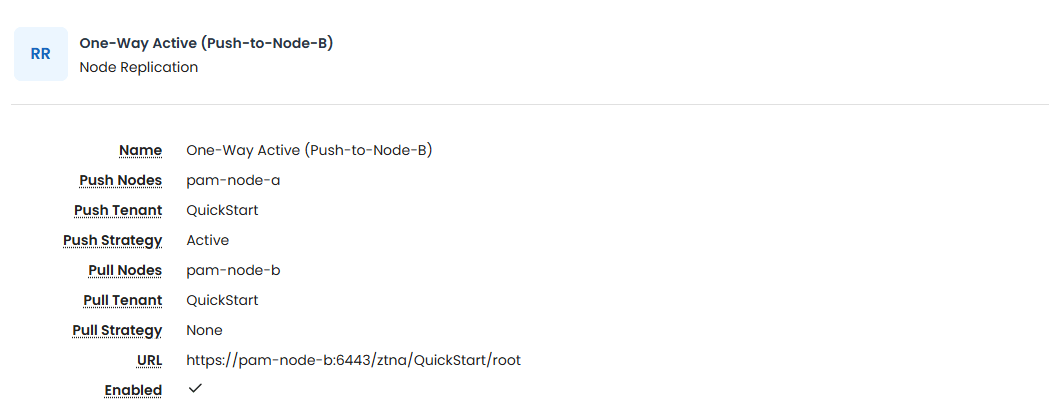
In this scenario, pam-node-a immediately pushes its local changes to pam-node-b. No data originating on Node B is ever replicated back to Node A.
Configuration on pam-node-a:
This entry forces Node A to actively connect outwards to Node B whenever local data changes.
- Name: One-Way Active (Push-to-Node-B)
- Push Nodes: pam-node-a
- Push Tenant: QuickStart
- Push Strategy: Active
- Pull Nodes: pam-node-b
- Push Tenant: QuickStart
-
Pull Strategy: None
-
URL: https://pam-node-b:6443/ztna/QuickStart/root
-
Token: [API_Token_Generated_On_Node_B]
-
Verify Host: Enable host name verification on the peer node certificate. True/False
- Allow Jobs: Allows Jobs running on the this node. The setting is useful to disable jobs on the DR or secondary HA node. Recommend
Trueon primary node. - Enabled: True
Configuration on pam-node-b:
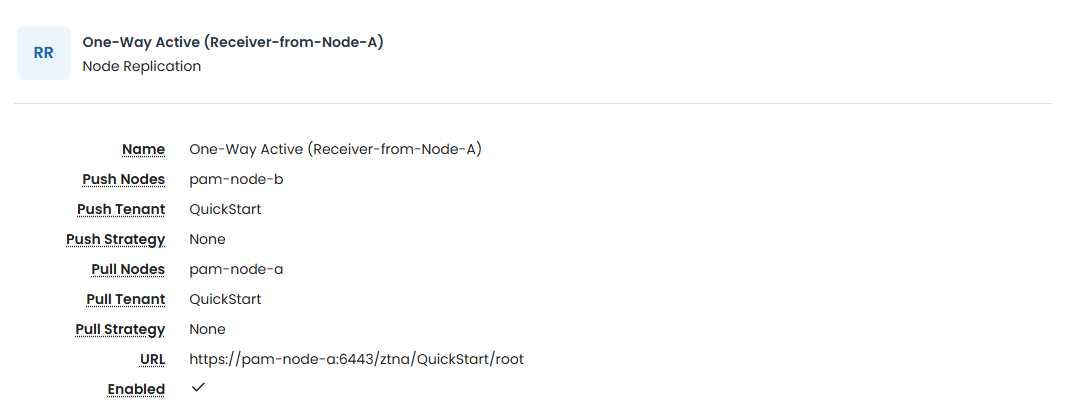
Per the Authorization Alignment Matrix, Node B requires no corresponding active replication entry to receive these push transactions. Its default API endpoints will handle the incoming stream. Both strategies remain disabled (None).
- Name: One-Way Active (Receiver-from-Node-A)
- Push Nodes: pam-node-b
- Push Tenant: QuickStart
- Push Strategy: None
- Pull Nodes: pam-node-a
- Push Tenant: QuickStart
-
Pull Strategy: None
-
URL: https://pam-node-a:6443/ztna/QuickStart/root
-
Token: [API_Token_Generated_On_Node_A]
-
Verify Host: Enable host name verification on the peer node certificate. True/False
- Allow Jobs: Allows Jobs running on the this node. The setting is useful to disable jobs on the DR or secondary HA node. Recommend
Falseon all DR or secondary nodes to avoid concurrent job execution which may result in failures. Read the Allow Jobs section for more information. - Enabled: True
Two-Way Active Push (Bidirectional / Dual-Active)
This configuration expands on Example 1. If an asset or configuration is created, updated, or deleted on either pam-node-a or pam-node-b, the change is immediately mirrored to the peer node.
Configuration on pam-node-a:
Node A retains its active outbound configuration pushing to Node B.
- Name: Two-Way Active (Push-to-Node-B)
- Push Nodes: pam-node-a
- Push Tenant: QuickStart
- Push Strategy: Active
- Pull Nodes: pam-node-b
- Push Tenant: QuickStart
-
Pull Strategy: None
-
URL: https://pam-node-b:6443/ztna/QuickStart/root
-
Token: [API_Token_Generated_On_Node_B]
-
Verify Host: Enable host name verification on the peer node certificate. True/False
- Allow Jobs: Allows Jobs running on the this node. The setting is useful to disable jobs on the DR or secondary HA node. Recommend
Trueon primary node. - Enabled: True
Configuration on pam-node-b:
Node B matches Node A's behavior by establishing an active outbound push worker pointing back to Node A. To prevent loop replication, Push Nodes explicitly isolates local pam-node-b modifications.
- Name: Two-Way Active (Push-to-Node-A)
- Push Nodes: pam-node-b
- Push Tenant: QuickStart
- Push Strategy: Active
- Pull Nodes: pam-node-a
- Push Tenant: QuickStart
-
Pull Strategy: None
-
URL: https://pam-node-a:6443/ztna/QuickStart/root
-
Token: [API_Token_Generated_On_Node_A]
-
Verify Host: Enable host name verification on the peer node certificate. True/False
- Allow Jobs: Allows Jobs running on the this node. The setting is useful to disable jobs on the DR or secondary HA node. Recommend
Falseon all DR or secondary nodes to avoid concurrent job execution which may result in failures. Read the Allow Jobs section for more information. - Enabled: True
One-Way Scheduled Push (Unidirectional Batching)
This layout mirrors the functional direction of Example 1 (pam-node-a to pam-node-b), but transitions execution from immediate low-latency replication to a timed, batched interval. This strategy processes both Active Data and Passive Data (such as transactional logs).
Configuration on pam-node-a:
- Name: Scheduled-Push-to-Node-B
- Push Nodes: pam-node-a
- Push Tenant: QuickStart
- Push Strategy: Scheduled
- Pull Nodes: pam-node-b
- Push Tenant: QuickStart
-
Pull Strategy: None
-
URL: https://pam-node-b:6443/ztna/QuickStart/root
-
Token: [API_Token_Generated_On_Node_B]
-
Verify Host: Enable host name verification on the peer node certificate. True/False
- Allow Jobs: Allows Jobs running on the this node. The setting is useful to disable jobs on the DR or secondary HA node. Recommend
Trueon primary node. - Enabled: True
Configuration on pam-node-b:
- Name: Scheduled-Receiver-From-Node-A
- Push Nodes: pam-node-a
- Push Tenant: QuickStart
- Push Strategy: None
- Pull Nodes: pam-node-b
- Push Tenant: QuickStart
-
Pull Strategy: None
-
URL: https://pam-node-a:6443/ztna/QuickStart/root
-
Token: [API_Token_Generated_On_Node_A]
-
Verify Host: Enable host name verification on the peer node certificate. True/False
- Allow Jobs: Allows Jobs running on the this node. The setting is useful to disable jobs on the DR or secondary HA node. Recommend
Falseon all DR or secondary nodes to avoid concurrent job execution which may result in failures. Read the Allow Jobs section for more information. - Enabled: True
These structural baselines can be combined or adapted to meet more advanced topology demands, such as multi-spoke hub environments or disaster recovery targets.