Node Replication
Introduction
The 12Port PAM solution supports data replication between application nodes. The replication component maintains a journal of data modifications, including create, update, and delete operations for configuration, management, and log data.
The replication process synchronizes these data modifications with configured peer nodes through the application REST API.
Deployment Scenarios
Replication is useful in the following deployment scenarios.
Note that peer nodes in replication scenarios store business data in their backend databases. This is different from peer nodes used in pure access scenarios, which do not store data and only broker network traffic from the Main node to the endpoints.
Different business requirements and network conditions, such as latency between regions, may require different approaches to data storage, synchronization, and access routing.
Disaster Recovery
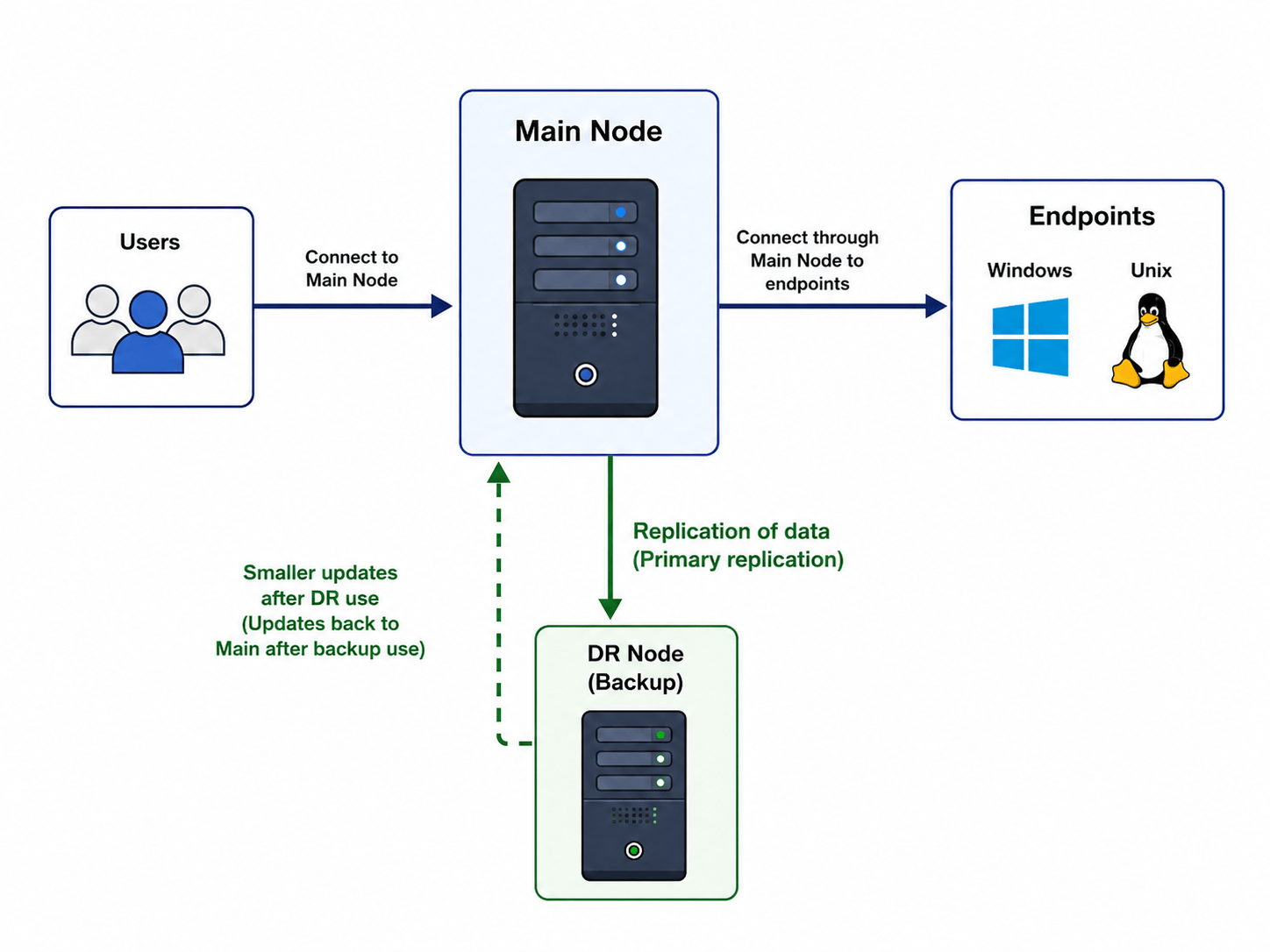
A Disaster Recovery (DR) node is a backup node that can be used when the Main node is unavailable. During normal operation, the replication process synchronizes data from the Main node to the DR node. If the Main node becomes unavailable, users switch to the DR node. When the Main node becomes available again, the replication process copies updated data and logs back to the Main node.
This method of DR node maintenance requires online connectivity between the Main and DR nodes. If direct connectivity between the nodes is not available or not desirable, system owners can use backup and auto-restore as an alternative method.
Multi-Site Deployment
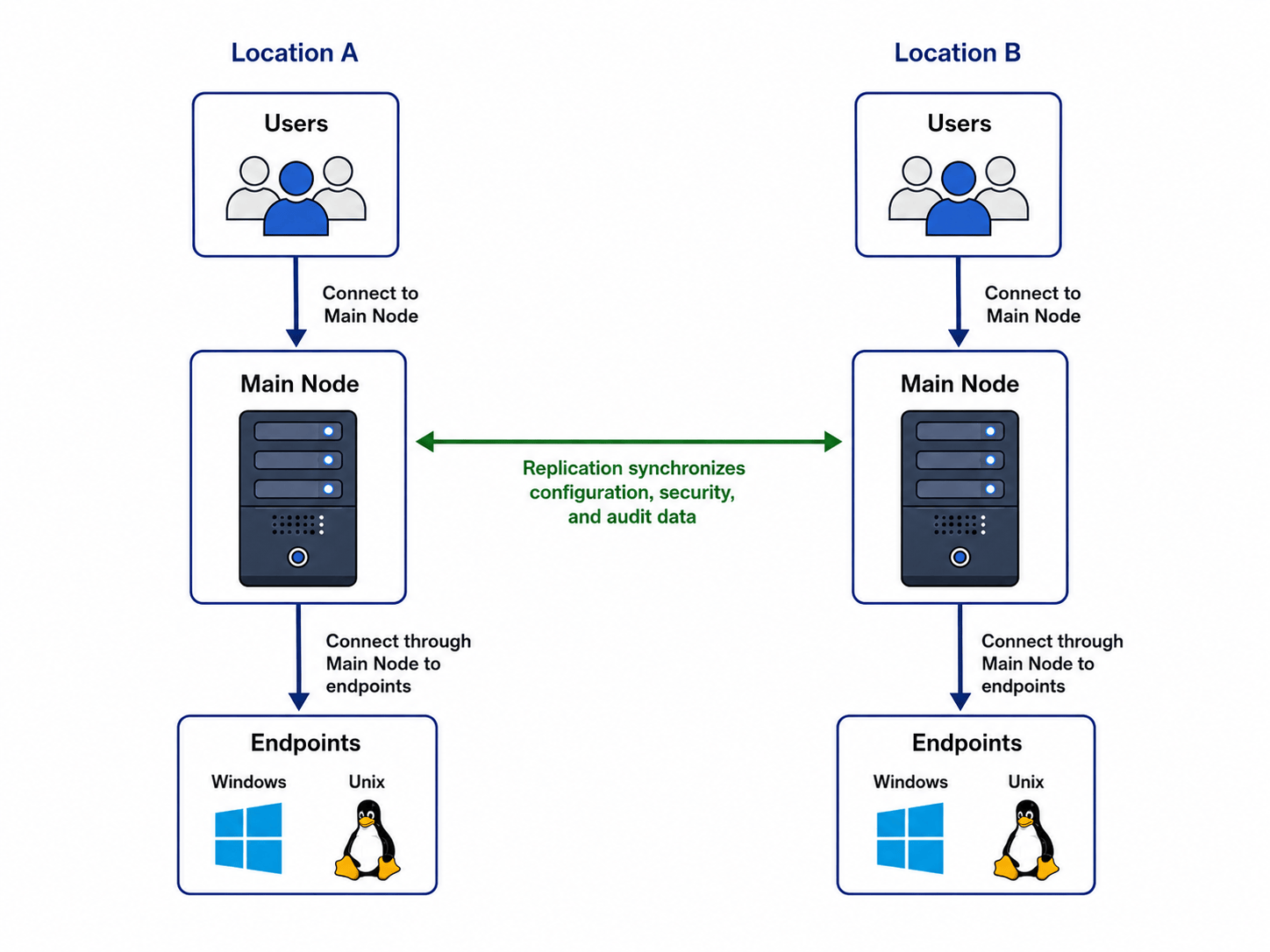
This scenario uses two active Main nodes that serve endpoints in different regions or locations, such as isolated cloud virtual networks or disconnected datacenters. Users in each region connect to the alternative Main node located closest to them. The replication process maintains a unified configuration, security scheme, and audit logs between the alternative Main nodes.
An example of this deployment is two relatively independent business locations in different countries that use the same policies and maintain transparent audit records.
For high availability (HA) deployments within the same region and location, system owners are advised to deploy Main nodes connected to the same backend database with native database replication. This approach provides better performance because it avoids application-level data synchronization between nodes.
Autonomous Peer
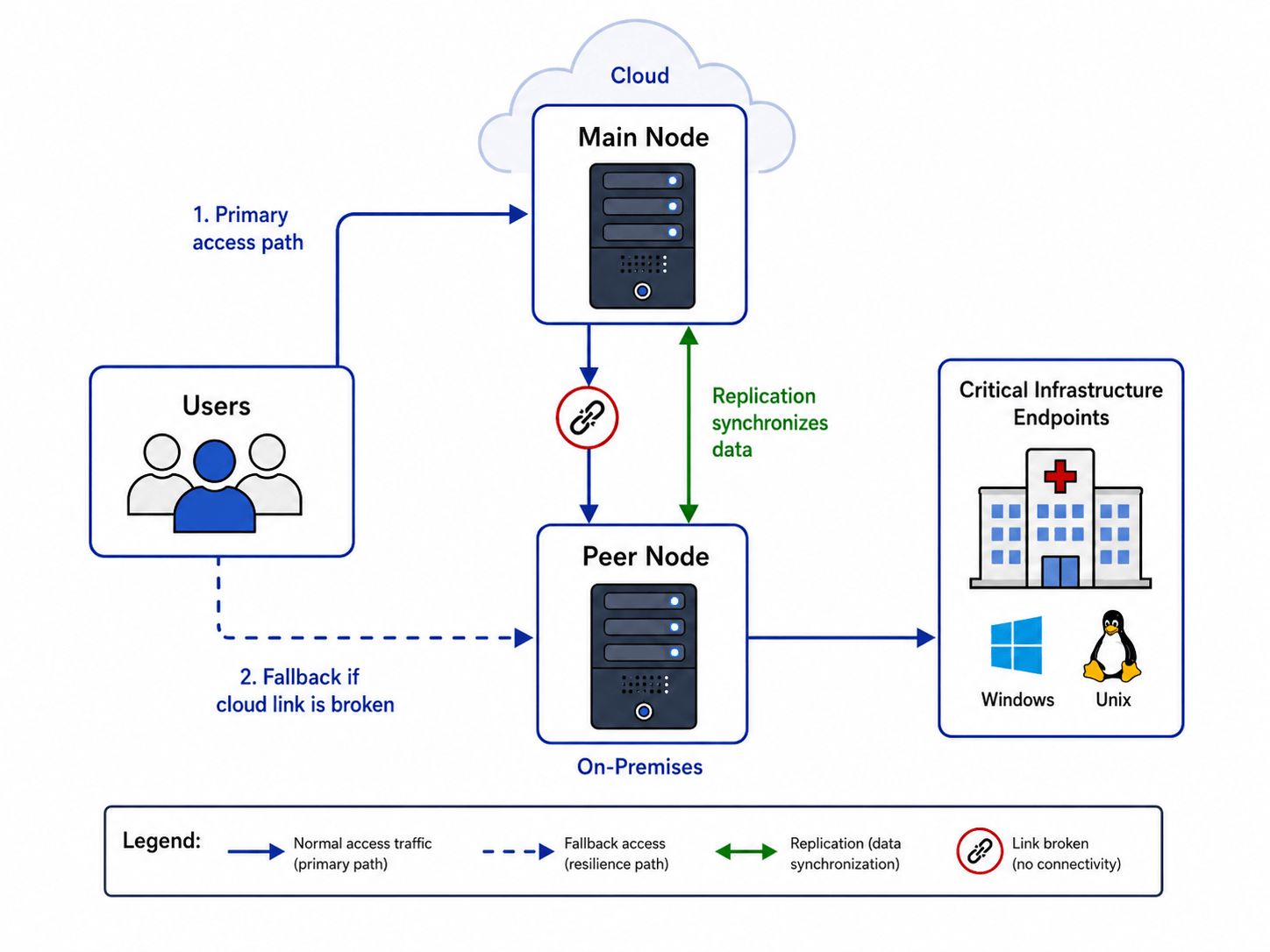
A peer node with data caching allows system owners to deploy a peer node in an isolated virtual private network or datacenter to access endpoints that are not directly reachable from the Main node.
Unlike a true peer node deployment, which does not store any data, users connect to assets through the caching peer node. This deployment remains resilient when connectivity between the Peer and Main nodes is unavailable or low quality.
At the same time, system owners continue to configure the system and analyze activity through the Main node by using data replicated from the peer nodes.
Session Relay
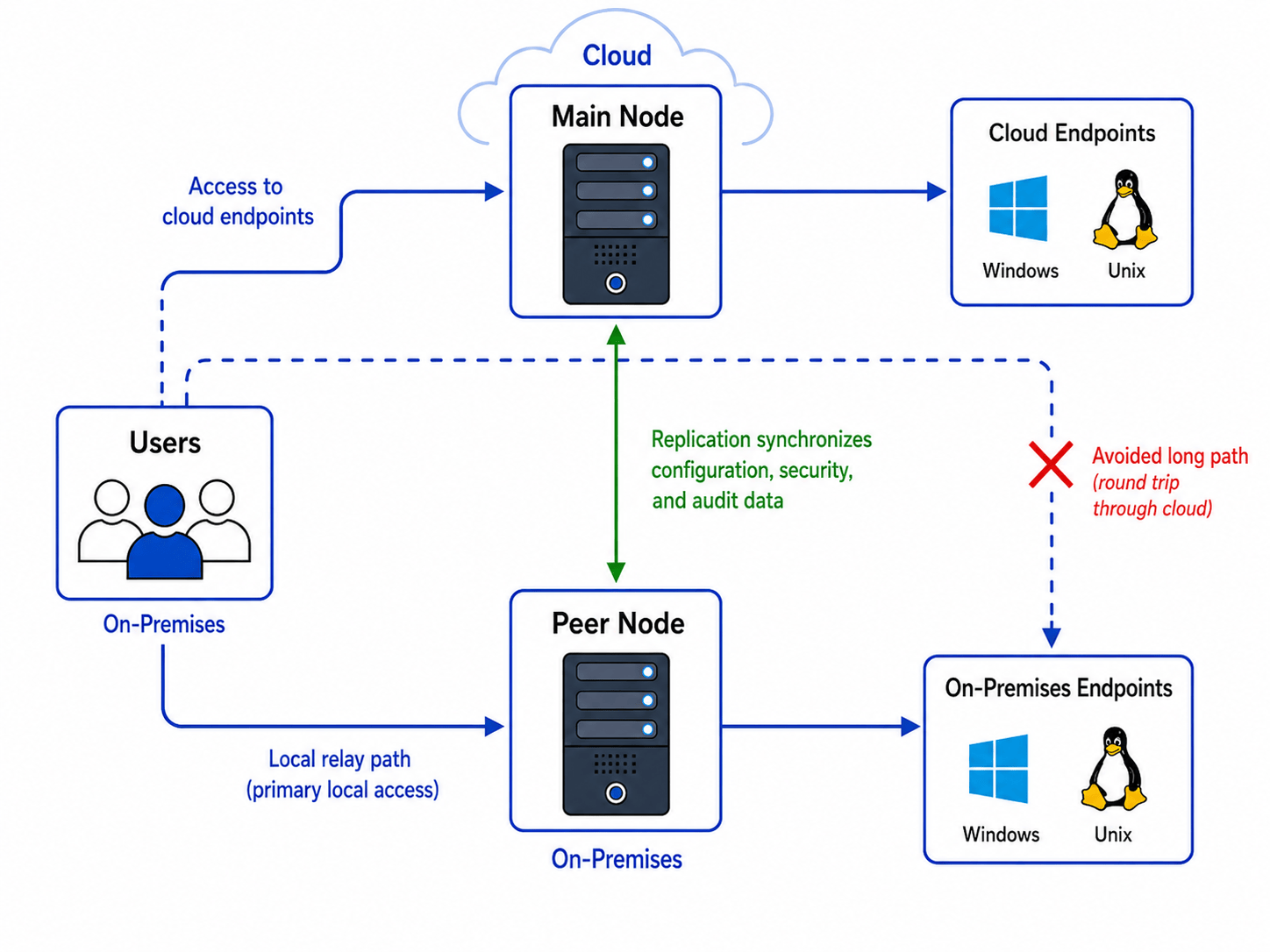
A peer node with data caching can improve session performance when both users and destination endpoints are located in the same region or on-premises network, while the control plane for configuration and data analysis is located outside that network.
In this scenario, the peer node provides fast traffic relay within the same network or datacenter. This avoids routing the session through the Main node when the asset is already located in the user’s local network.
Examples of this configuration include
- The Main node is deployed in the cloud, while users access endpoints located in the same office through a peer node deployed in that office. The replication process synchronizes data between the Peer and Main nodes.
- The Main node serves users and endpoints inside a primary business office, while users in a remote office use their own Peer node to access endpoints in that remote office. The Peer node relies on replicated data to distribute configuration, run the approval process, and collect audit logs.
Replication Characteristics and Terminology
Multi-tenancy
Data replication is configured at the tenant level. A single deployment can include multiple tenants, each with its own replication peers, while other tenants may have no replication configured.
Database agnostic deployment
The replication process synchronizes data between nodes as an object model through the REST API over secure HTTPS transport. As a result, replication peers can use different backend databases.
Types of the replicated data
The replication process classifies application data into two categories: Active and Passive.
- Active data includes operational and configuration-related information, such as:
- Configuration settings, including LDAP and SMTP
- Management objects, including Asset Types, Assets, Scripts, and Workflow Forms
- Operational data, including Sessions, Access Requests, and Users
- Passive data includes collected records such as:
- Logs
- Reports
Push and Pull Modes
To support different network connectivity scenarios between nodes, the replication process operates in two complementary modes: Push and Pull.
The Push process propagates changes from the local node to the remote peer node. It creates, updates, or deletes data on the remote peer node.
The Pull process retrieves update packages from the remote peer node and applies the changes locally by creating, updating, or deleting data on the local node.
The choice between Push and Pull mode is driven by network restrictions, specifically which node can connect to its peer. It is not determined by the business meaning of the data or by where the data originated. For example, the Main node can push new data to the DR node, or the DR node can pull the same data from the Main node.
Performance Strategies
To balance replication performance, Push replication supports the following strategies:
- Passive strategy does not initiate replication directly. Instead, it stores update information that can later be retrieved by the Pull process configured on the remote peer node.
- Active strategy immediately initiates replication of Active data to the remote peer node. If the peer node is unavailable, the Push process automatically falls back to the Background strategy. The Active strategy requires high-speed network connectivity to the peer node to maintain reasonable GUI response time.
- Background strategy runs a background task on the local node to replicate Active data to the remote peer node. This strategy does not block the GUI. Instead, it synchronizes data in a background process triggered by the update. The process may wait until the remote node becomes available. If the peer node remains unavailable after several attempts, the Push process falls back to the Scheduled strategy.
- Scheduled strategy periodically synchronizes both Active and Passive data with the remote peer node using a scheduled background task. Scheduled Push and Pull are the only strategies that replicate Passive data.
- None strategy disables Push replication.
Pull replication supports the following strategies:
- Background strategy periodically initiates the Pull process using a scheduled background task.
- None strategy disables Pull replication.
The choice of Push and Pull strategies is driven by the required balance between application performance, network performance, and how quickly data is expected to appear on the peer node.
Peers Network
Configuring multiple replication connections can result in data on the local node that originated from several different nodes. To control the synchronization scope, both Push and Pull replication support filtering data by the originating node. This allows replication to include only data associated with specific nodes.
This option supports star topology deployments. In this model, the Main node can synchronize only data originated by the Main node, such as configuration or security scheme data, with a specific Peer node while ignoring data originated by other Peer nodes.
Peer authentication and authorization
Because the replication process runs over the REST API using HTTPS transport, a node authenticates a peer node using a regular API token.
A node authorizes another node to perform replication activity through the replication configuration, which designates that node as a replication peer.
For technical implementation details and configuration examples, please refer to the Replication Configuration Guide. That resource provides a complete parameter reference schema, including essential API token security prerequisites like the Site Role: Service requirement, alongside examples for setting up unidirectional, bidirectional, and scheduled replication profiles.