Zero-Trust Methods for Secure Database Access
Introduction
Databases are at the heart of modern enterprises, storing some of the organization's most sensitive and business-critical information. While web applications provide controlled interfaces for business users to create, modify, access, and analyze data, many other users require more direct and privileged access to the underlying databases.
Database administrators (DBAs), developers, data analysts, data scientists, and external contractors routinely connect to database servers to manage infrastructure, develop applications, troubleshoot issues, perform maintenance, and analyze data. These activities are essential to business operations, but they also introduce significant security risks when privileged access is not properly controlled.
Securing database access requires more than protecting credentials and authenticating users. Organizations need to control who can access databases, under what conditions, through which applications, and what actions they can perform during privileged sessions.
A Zero Trust approach extends security controls beyond the initial login, combining identity verification, least-privilege access, continuous policy enforcement, session monitoring, and comprehensive auditing. These controls must apply consistently to employees, administrators, developers, and third-party contractors, whether they connect from corporate networks or remote locations.
To support these requirements, a modern Privileged Access Management (PAM) solution should provide:
-
Credential Injection: Establish database connections without exposing privileged credentials or passwords to users.
-
Multi-Factor Authentication (MFA): Verify user identities before granting privileged access.
-
Role-Based Access Control (RBAC): Restrict access based on user roles, responsibilities, and permissions.
-
Approval Workflows: Require authorization before granting access to sensitive databases or privileged sessions.
-
Session Monitoring and Auditing: Record database activity, including executed SQL statements, for security investigations and compliance.
-
Continuous Session Intelligence: Analyze privileged activity in real time to detect suspicious behavior and enforce security policies.
-
Transparent and Secure Access: Allow users to work with familiar database tools while minimizing disruptions to existing workflows.
-
Centralized Policy Enforcement: Apply consistent access controls across database servers, applications, and environments.
Not all database access methods offer the same level of security, flexibility, and operational convenience. Some require users to work through controlled remote desktops or web-based database management interfaces, while others allow direct connections from familiar desktop and mobile applications.
Choosing the right approach involves balancing security requirements, user experience, application compatibility, deployment complexity, and ongoing maintenance.
In this article, we explore three methods of securing privileged database access using the 12Port Zero Trust Privileged Access Management (PAM) platform:
-
Database Access Through an RDS Jump Host: Secure access to desktop database management applications running on a controlled Remote Desktop Services (RDS) host.
-
Database Access Through WEB HTTP Sessions: Browser-based access to web database management applications with centralized authentication, access control, and session oversight.
-
Direct Database Access Using Desktop or Mobile Clients: Secure, governed connections from native database tools to database servers, with credential injection, session auditing, and policy enforcement.
Each method offers distinct advantages and trade-offs in security, usability, application compatibility, infrastructure requirements, and maintenance.
Understanding these differences helps organizations select the most appropriate approach for protecting sensitive data without compromising the productivity of DBAs, developers, analysts, and other privileged users.
Database Access Through an RDS Jump Host
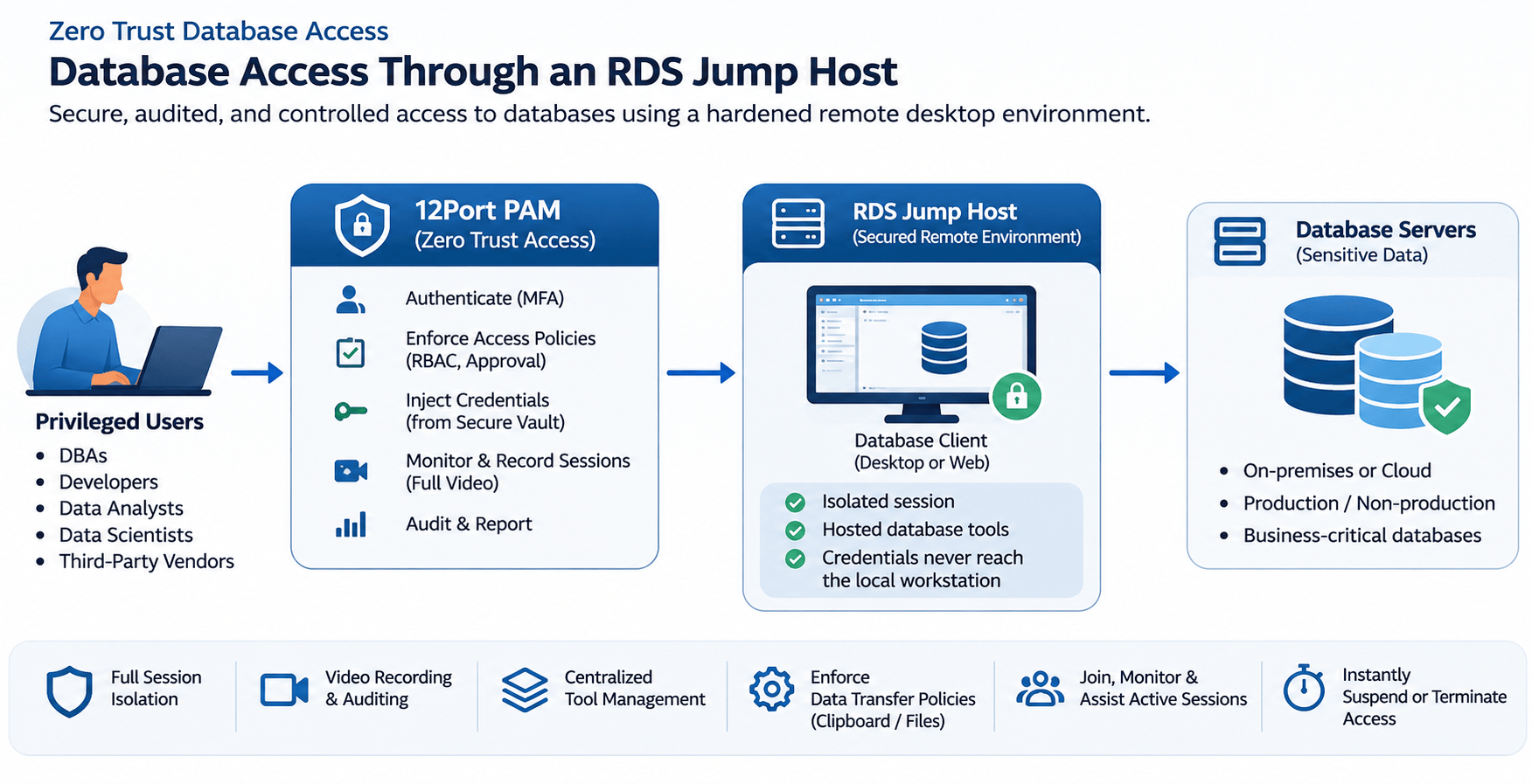
This approach provides secure database access through desktop or web-based database clients running on a hardened Remote Desktop Services (RDS) jump host.
Users first authenticate to the 12Port PAM platform, which securely brokers a connection to the RDS jump host. Once connected, 12Port automatically launches the designated database client as the only application visible to the user. The client connects to the target database using connection information retrieved from the secure credential vault.
Before granting interactive control, 12Port PAM automatically injects privileged credentials from the vault into the database client's login interface. This eliminates the need to disclose database passwords to users or transfer credentials to their local workstations.
After successful authentication, the user gains control of the database client and can perform authorized tasks. All interactions take place within the isolated remote session rather than directly from the user's endpoint.
Note
The primary advantages of this approach are credential protection, session isolation, centralized access control, and comprehensive session recording, while allowing users to work with familiar database management tools.
However, this method requires additional infrastructure, including hardened RDS jump hosts, database client installations, and ongoing maintenance of the remote desktop environment. It also introduces additional resource consumption and operational complexity.
Historically, RDS jump hosts have been a common approach to securing privileged database access through PAM solutions. While effective, this architecture carries infrastructure and maintenance overhead that newer browser-based and direct database access technologies can reduce or eliminate.
Summary
- Client Application: Desktop or web-based database client hosted on an RDS server.
- Infrastructure: Hardened RDS jump host.
- User Experience: Familiar database management tools running in a remote session.
- Application Compatibility: Desktop and web-based database clients supported by the RDS environment.
Best-Fit Scenarios
- High-security database administration environments.
- Management of business-critical databases.
- Regulated industries with strict access control and auditing requirements.
- Third-party vendor and contractor access.
- Organizations with existing PAM-managed RDS infrastructure.
Key Advantages
- Session Isolation: Database clients and privileged credentials remain within the controlled RDS environment.
- Session Recording: Full video recording and auditing of privileged sessions.
- Centralized Tool Management: Database clients are installed, configured, and maintained on centralized servers.
- Credential Protection: Privileged credentials are injected without being transferred to users' local workstations.
- Data Transfer Controls: Clipboard and file transfer restrictions can be enforced.
- Real-Time Session Control: Active sessions can be immediately suspended or terminated.
- Session Collaboration: Managers and peer administrators can join active sessions for monitoring, training, and remote assistance, subject to applicable permissions and approvals.
- Access Governance: Role-based access policies, approval workflows, and centralized access auditing.
- Infrastructure Reuse: Existing RDS infrastructure can also support privileged access to web portals, legacy administrative tools, and other applications.
Trade-Offs
- Additional Infrastructure: Requires dedicated RDS hosts and supporting components.
- Higher Resource Consumption: Remote desktop sessions consume additional server resources.
- Limited SQL-Level Visibility: Session recordings do not inherently capture structured SQL statements or query result sets.
- Operational Complexity: Requires deployment, configuration, patching, and ongoing maintenance of RDS hosts and database clients.
Database Access Through WEB HTTP Sessions
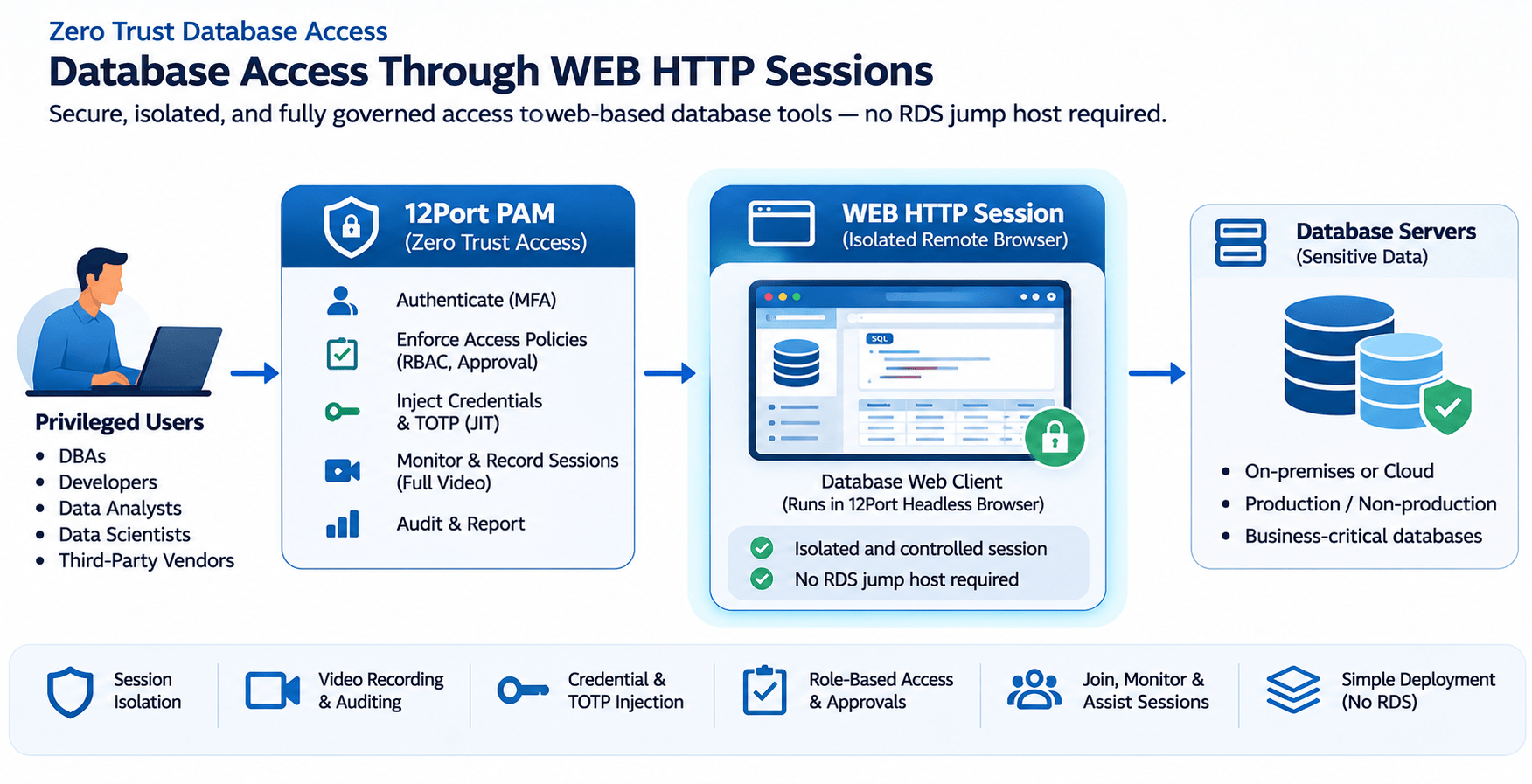
This approach provides secure access to web-based database management applications through WEB HTTP Sessions brokered directly by the 12Port PAM platform. It combines the security benefits of remote browser isolation with a simpler architecture that eliminates the need for dedicated RDS jump hosts.
Unlike traditional RDS-based access, this method uses a headless browser running on a 12Port PAM node. The remote browser session is securely streamed to the user's local browser through an HTML5 gateway, without requiring additional client software or browser extensions.
In this model, 12Port PAM acts as a secure intermediary between the user and the web-based database management application. Rather than allowing the user's endpoint to connect directly to the application, the platform establishes, isolates, and controls the entire HTTP/HTTPS session within the PAM-managed environment.
Before granting access, 12Port automatically injects privileged credentials and, when required, Time-Based One-Time Passwords (TOTP) into the application's authentication interface. This enables users to access authorized database management tools without exposing privileged credentials to their local workstations.
Once authenticated, users interact with the database application through a familiar browser interface, while 12Port maintains centralized control over the session. All interactions remain within the isolated remote browser environment, enabling session recording, activity monitoring, access policy enforcement, and auditing.
Note
The primary advantage of this approach is delivering secure, isolated, and fully governed access to web-based database management tools without the infrastructure and maintenance overhead of traditional RDS jump hosts.
By combining browser isolation, automated credential injection, and centralized session governance, organizations can extend Zero Trust controls to browser-based database administration while preserving a familiar user experience and simplifying deployment.
Summary
- Client Application: Browser-based database management application.
- Infrastructure: PAM-managed remote browser environment with an HTML5 session gateway.
- User Experience: Familiar browser interface without additional client software or extensions.
- Application Compatibility: Web-based database management tools.
Best-Fit Scenarios
- Enterprises implementing centralized Zero Trust access across multiple environments.
- Regulated industries requiring strong access controls and comprehensive session auditing.
- Organizations of any size seeking simplified, secure database administration.
- Managed Service Providers (MSPs) delivering browser-based privileged access to multiple customers.
- Organizations looking to eliminate dedicated RDS jump hosts and reduce infrastructure complexity.
- Distributed workforces and third-party contractors requiring secure access without installing client software or browser extensions.
Key Advantages
- Transparent User Experience: Familiar browser-based access with centralized session controls consistent with other PAM-managed WEB sessions, including RDP and SSH.
- Session Recording and Auditing: Full video recording, activity monitoring, and centralized session auditing.
- Access Governance: Role-based access policies, approval workflows, and comprehensive access auditing.
- Credential Protection: Privileged credentials remain within the PAM-controlled environment and are never transferred to users' local workstations.
- Automated Authentication: Secure credential injection and just-in-time TOTP generation and injection.
- Data Transfer Controls: Clipboard and file transfer policies can be enforced.
- Real-Time Session Control: Active sessions can be immediately suspended or terminated.
- Session Collaboration: Managers and peer administrators can join active sessions for monitoring, training, and remote assistance, subject to applicable permissions and approvals.
- Simplified Infrastructure: No dedicated RDS jump hosts or remote desktop application hosting required.
- Agentless Access: No client-side agents, database client installations, or browser extensions required.
Trade-Offs
- Server Resource Consumption: Remote browser isolation requires CPU and memory resources on the PAM nodes hosting browser sessions.
- Limited SQL-Level Visibility: Session recordings do not inherently capture structured SQL statements or query result sets.
- Browser Application Dependency: Supports web-based database management applications rather than native desktop database clients.
Direct Database Access Using Desktop or Mobile Clients
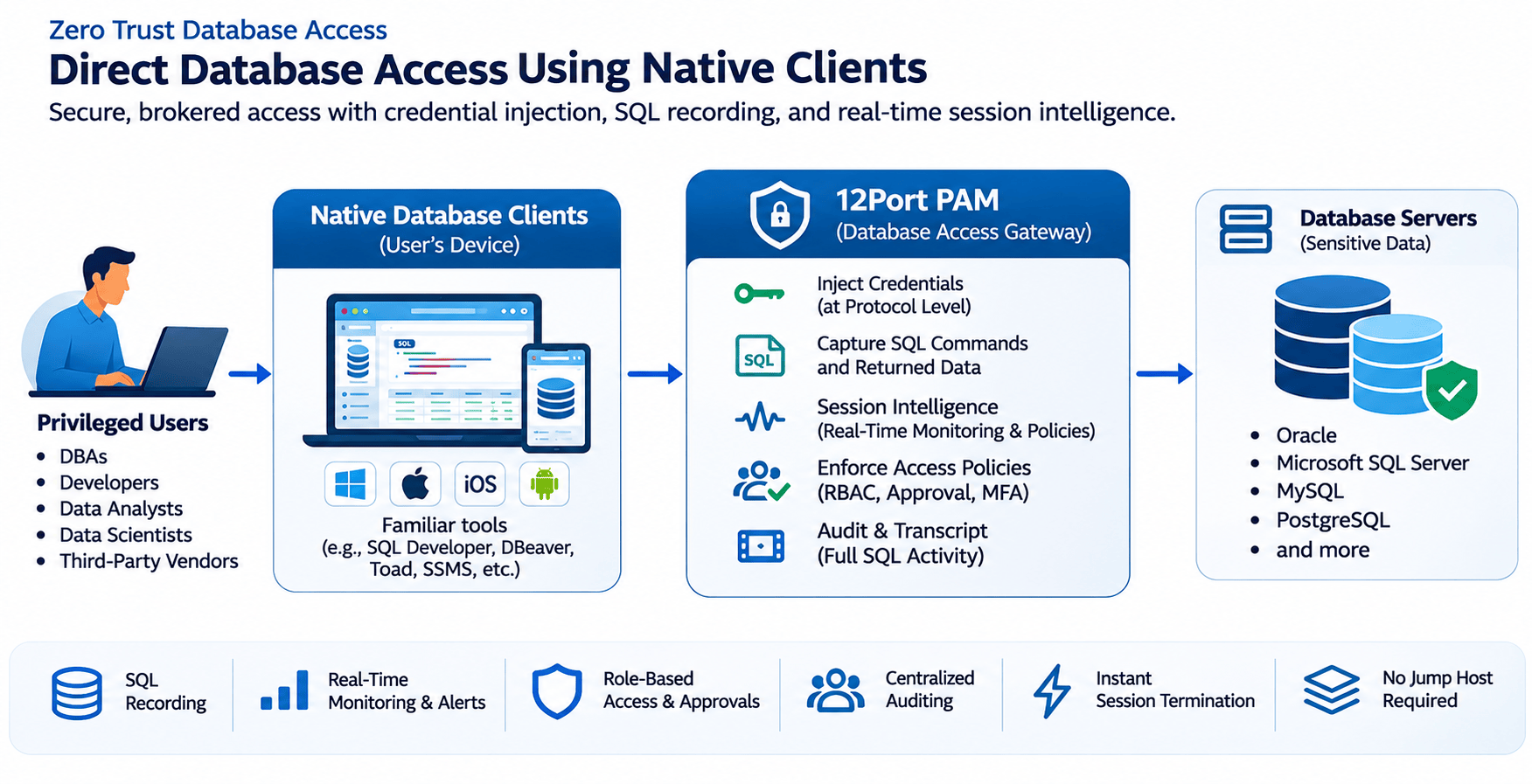
This approach provides secure, direct database access using native desktop, mobile, or web-based database clients, with connections transparently brokered through the 12Port PAM platform. It offers maximum flexibility by allowing users to work with their preferred database management tools while eliminating the need for dedicated RDS jump hosts or remote browser infrastructure.
Unlike approaches that rely on remote application hosting or browser isolation, this method operates directly at the database network protocol level. The 12Port PAM platform acts as an intelligent intermediary between the user's database client and the target database server, controlling and monitoring database communications throughout the session.
When a connection is established, 12Port automatically injects privileged credentials from its secure vault into the database authentication protocol, eliminating the need to disclose database passwords to users or store them on local workstations.
Throughout the session, the platform monitors database traffic, records executed SQL statements, and captures returned results in detailed session transcripts. These records provide granular visibility into database activity, enabling security teams to investigate privileged operations, track access to sensitive data, and support compliance requirements.
By analyzing database protocol traffic in real time, 12Port Session Intelligence can also detect suspicious activity, generate security notifications, and enforce policies, including automatic session termination when configured conditions are met.
Note
The primary advantage of this approach is combining the flexibility of native database tools with credential protection, SQL-level auditing, real-time session intelligence, and centralized Zero Trust access governance.
Organizations can provide secure, governed access to sensitive databases without changing how DBAs, developers, and analysts work or deploying additional remote desktop or browser hosting infrastructure.
Summary
- Client Application: Native desktop, mobile, or compatible web-based database clients.
- Infrastructure: PAM-managed database protocol gateway.
- User Experience: Familiar database management tools running directly on users' devices.
- Application Compatibility: Database clients using supported database protocols.
Best-Fit Scenarios
- Enterprises implementing centralized Zero Trust access across multiple database environments.
- Regulated industries requiring detailed SQL-level auditing and privileged access controls.
- Organizations seeking flexibility in database management tools without sacrificing security visibility and governance.
- Organizations of any size seeking simplified, secure database access.
- Environments looking to eliminate dedicated RDS jump hosts and remote browser infrastructure.
- Distributed workforces and third-party contractors requiring secure access without installing additional client-side agents.
Key Advantages
- Native Client Experience: Users work with their preferred desktop, mobile, or compatible web-based database tools without changing established workflows.
- Access Governance: Role-based access policies, approval workflows, and centralized access auditing.
- SQL-Level Auditing: Captures executed SQL statements and returned results in detailed session transcripts.
- Real-Time Session Intelligence: Analyzes database traffic to detect suspicious activity, generate notifications, and enforce security policies.
- Credential Protection: Privileged database credentials are injected at the protocol level without being disclosed to users or stored on their local workstations.
- Real-Time Session Control: Active database connections can be immediately terminated based on administrative actions or security policies.
- Simplified Infrastructure: No dedicated RDS jump hosts or remote browser hosting infrastructure required.
- Agentless Access: No additional client-side agents or browser extensions required.
Trade-Offs
- No Session Video Recording: Database activity is captured through protocol-level session transcripts rather than visual recordings of the user's desktop.
- Protocol Compatibility: Support is limited to database protocols and authentication mechanisms implemented by the PAM gateway.
- Limited Endpoint Isolation: Database clients run locally, allowing query results and exported data to reach the user's device rather than remaining within an isolated remote environment.
Choosing the Right Database Access Strategy
There is no one-size-fits-all approach to securing privileged database access. The most effective strategy depends on several factors:
- Security and data protection requirements
- User experience and productivity expectations
- Infrastructure and maintenance costs
- Regulatory and compliance obligations
- Existing infrastructure and deployment architecture
- Database client and protocol compatibility
- Operational complexity and scalability
Many organizations benefit from a hybrid approach, combining multiple access methods to balance security, flexibility, visibility, and operational efficiency.
For DBAs, data scientists, developers, and other technical users, direct database access through a PAM-managed database protocol gateway offers the greatest flexibility. It allows users to work with their preferred database tools while providing centralized access governance, credential protection, detailed SQL activity recording, and real-time Session Intelligence.
For environments requiring stricter control over the client execution environment, RDS jump hosts and WEB HTTP Sessions provide an additional layer of isolation. These approaches keep database management applications within controlled environments and enable full video recording of privileged sessions.
The choice between RDS and WEB HTTP Sessions depends primarily on application compatibility and infrastructure requirements. RDS supports traditional desktop database tools, while WEB HTTP Sessions offer a simpler, browser-based alternative without dedicated jump host infrastructure.
The goal is not to standardize on a single access method, but to apply the appropriate Zero Trust controls to each database, user, and operational scenario.
By supporting all three approaches, the 12Port Zero Trust PAM platform enables organizations to secure sensitive data, maintain visibility into privileged activity, and preserve user productivity without unnecessary infrastructure complexity.